Your repository is your most important prompt

AGENTS.md is becoming a cross-tool standard. The Agent Skills specification has 26+ tools on board. Cursor, Copilot, Cline, Gemini, they all have their own context files now, and they’re starting to read each other’s. There’s an emerging architecture for how a repository should talk to AI agents, and most developers haven’t noticed yet.
This post maps that architecture. Not theory, the actual file structure, what goes where, and why.
README.md, the original context file
Before CLAUDE.md or AGENTS.md existed, before .cursorrules, before any of this, there was README.md.
README has been the “explain this project to a stranger” file since the early days of open source. Structure, setup instructions, conventions, architecture decisions. It was always context engineering. We just called it documentation.
Here’s what changed: the stranger reading your README is no longer always human. The difference is audience. README.md explains your project to a new contributor who can ask follow-up questions, browse the UI, read between the lines. An AI agent needs explicit, structured, parseable instructions. “See the docs for more info” doesn’t help when the agent doesn’t know which docs you mean.
README.md is the foundation. Everything else builds on top of it. Keep it updated, it’s earning double duty now.
The root context file, your repo’s elevator pitch to AI
Every major AI coding tool now has a root context file. Here’s the landscape:
| Tool | Primary File | Also Reads |
|---|---|---|
| Claude Code | CLAUDE.md | AGENTS.md (via import) |
| Cursor | AGENTS.md | .cursor/rules/*.mdc, legacy .cursorrules |
| GitHub Copilot | .github/copilot-instructions.md | AGENTS.md, CLAUDE.md |
| Cline | .clinerules/ | .cursorrules, .windsurfrules, AGENTS.md |
| Gemini CLI | GEMINI.md | — |
| Windsurf | .windsurfrules | — |
| Aider | CONVENTIONS.md | loaded via --read flag |
Two things stand out. First: AGENTS.md is the closest thing to a universal standard. Cursor reads it natively. Cline reads it. Copilot reads it. Claude Code can import it with a single line: @AGENTS.md. If you want one file that works everywhere, start there.
Second: these tools are actively reading each other’s files. Copilot reads CLAUDE.md. Cline reads .cursorrules. The ecosystem is converging faster than the docs can keep up.
What goes in it
Anthropic’s best practices are blunt: keep it under 200 lines. Every line costs tokens in every session.
I’ll add my own take: most CLAUDE.md files I’ve seen are too long. People dump their entire architecture doc in there and wonder why the agent ignores half of it. A 500-line context file means 500 lines consumed before the agent reads a single line of your actual code. Treat it like a function signature, tell the agent exactly what it needs to know and nothing more.
Include:
- Build, test, and lint commands the agent can’t guess
- Code style rules that differ from language defaults
- Architecture decisions specific to your project
- Gotchas, things that will bite the agent if it doesn’t know
Leave out anything the agent can figure out by reading the code. Standard language conventions, file-by-file descriptions, long tutorials, all waste context.
The files nobody told you about
CLAUDE.md handles the basics, commands, conventions, gotchas. But there’s a whole layer of project knowledge that doesn’t belong in a context file. The kind of knowledge that shapes what the agent builds and for whom, not just how it builds.
Then I found out other people were doing the same thing, creating BRAND.md, PRODUCT.md, and DESIGN.md. Not because a spec told them to, but because their AI sessions kept producing generic output without them. A skill called Impeccable runs an /impeccable init command that interviews you about your product, your audience, your brand voice, and then writes PRODUCT.md and DESIGN.md for you by scanning your existing code. Every one of its 23 commands reads those files before generating anything. Corey Haines built 40+ marketing skills where every single skill, from cold email to SEO audit to churn prevention, checks a shared product-marketing-context.md file first. MindStudio documented a “Business Brain” pattern where brand voice, audience profiles, and positioning live in a brain/ directory that individual skills pull from selectively.
The pattern is the same everywhere: shared knowledge files that multiple skills consume. Here’s what each one holds:
PRODUCT.md
The product’s identity. What you’re building, for whom, what phase it’s in, what constraints exist. This is the file that prevents the agent from suggesting features that don’t fit your roadmap or building for an audience you’re not targeting. Impeccable generates this by asking about your register (marketing site vs. product UI), your audience, and your visual references. Without it, every session starts from zero context about why you’re building what you’re building.
DESIGN.md
Design tokens, color palettes, typography scales, spacing systems, component conventions. Google open-sourced a DESIGN.md format through Stitch that is becoming an industry standard: YAML tokens at the top for machines, markdown rationale below for humans. The awesome-design-md repo already has 57+ brand-inspired examples covering companies from Stripe to Figma to Linear. When the agent generates UI code with this file loaded, it uses the right tokens instead of inventing values. No more color: #3b82f6 when your blue is actually --color-primary-500.
BRAND.md
Voice, tone, audience, positioning, taboo phrases. Critical if your AI sessions produce any user-facing content: blog posts, docs, marketing, even error messages. The Business Brain pattern splits this into separate files (brand-voice.md, audience-profiles.md, content-rules.md), but a single BRAND.md works fine for smaller teams. Without it, the agent writes in generic corporate-speak. With it, the output sounds like your team.
DEPLOY.md
Deployment targets, CI/CD pipelines, infrastructure constraints. An agent that knows you deploy to Vercel with edge functions makes different architectural choices than one that doesn’t. This one has the least standardization so far. DevOps skills tend to carry their own deployment context, but a shared DEPLOY.md would save every infrastructure skill from asking the same questions.
These aren’t official standards yet. But the pattern is real: Impeccable generates them, marketing skill suites depend on them, Google is standardizing the format for design files. The gap between “convention” and “standard” is closing fast.
The key insight is how these files get consumed. They don’t all need to load every session. A skill that writes blog posts needs BRAND.md but doesn’t care about DEPLOY.md. A skill that scaffolds infrastructure needs DEPLOY.md but not BRAND.md. Context loaders, small scripts that discover and read the right files for the right task, make this practical. Load what’s relevant, skip what isn’t.
The .claude/ directory, a full operating system
If CLAUDE.md is the root context file, the .claude/ directory is the full extension system. The architecture follows one principle: progressive disclosure. Here’s how context actually flows during a Claude Code session, from boot to compression:
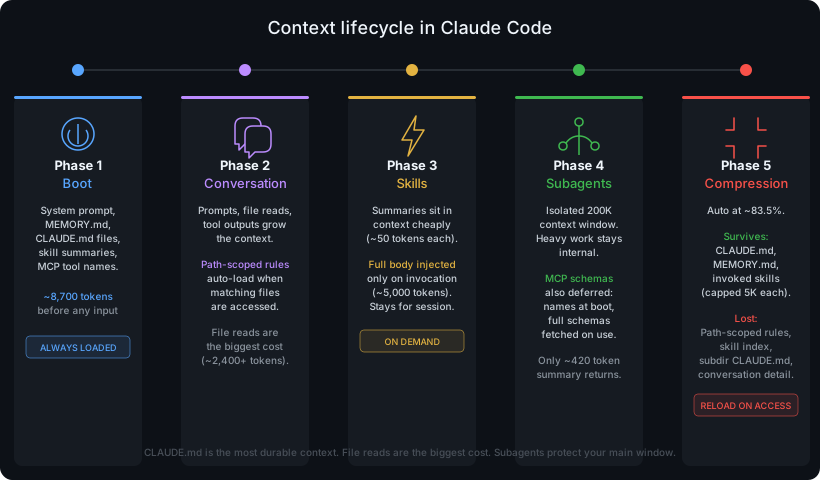
This is the part most developers miss. They put everything in CLAUDE.md because it’s the only file they know about. A 500-line CLAUDE.md where 400 lines are irrelevant to the current task. Progressive disclosure keeps the context window lean. Each layer loads only when needed, and the heaviest context (subagents) runs in complete isolation with its own context window (200K on Haiku, up to 1M on Opus/Sonnet), returning just a small summary to your main session.
One repo, every agent
Most teams don’t use just one AI tool. You might use Claude Code for complex tasks, Cursor for quick edits, Copilot for inline completions. Your teammate might prefer Cline. The repo needs to work with all of them.
Three convergence points make this possible:
AGENTS.md
The closest thing to a universal context file. Born from a collaboration between OpenAI, Google, Cursor, and others, now stewarded by the Linux Foundation. Read natively by Cline, GitHub Copilot, Cursor, and importable into Claude Code. If you maintain one cross-tool file, this is it. Put your project overview, conventions, and architecture here. Then in your CLAUDE.md: @AGENTS.md, one line, full import.
Agent Skills (agentskills.io)
An open standard for portable skills with 26+ tools on board: Claude Code, Cursor, Gemini CLI, GitHub Copilot, VS Code, OpenAI Codex, JetBrains Junie. The format is a SKILL.md file with YAML frontmatter, and it works the same way across tools. Laravel already ships first-party Agent Skills through its laravel/boost package. This is the standard gaining the most traction.
Cross-reading
Tools are actively reading each other’s files. Copilot reads CLAUDE.md. Cline reads .cursorrules, .windsurfrules, and AGENTS.md. Claude Code’s /init command reads existing .cursorrules and incorporates relevant parts. The ecosystem is converging.
For maximum compatibility:
- AGENTS.md at the root as your universal base
- CLAUDE.md that imports it: one line,
@AGENTS.md, plus any Claude-specific additions - .github/copilot-instructions.md if your team uses Copilot
- .cursor/rules/ if anyone uses Cursor
- Tool-specific files only when you need tool-specific behavior
If your CLAUDE.md has nothing Claude-specific, a symlink works: ln -s AGENTS.md CLAUDE.md.
The structure that actually works
Here’s the full architecture. Not every project needs all of it, start with the first level and grow as needed.
Level 1: The minimum viable setup
project/
├── README.md              # Project overview (for humans and AI)
├── AGENTS.md              # Universal AI context (cross-tool)
└── CLAUDE.md              # @AGENTS.md + Claude-specific rules
This takes 30 minutes to set up and covers most of the value. AGENTS.md holds everything tool-agnostic. CLAUDE.md imports it and adds anything Claude-specific. Every AI tool that touches your repo gets the basics right.
Level 2: Shared knowledge files
project/
├── README.md
├── AGENTS.md
├── CLAUDE.md              # References: @AGENTS.md, @PRODUCT.md, @DESIGN.md
├── PRODUCT.md             # Roadmap, constraints, audience, phase
├── DESIGN.md              # Tokens, typography, spacing, component rules
├── BRAND.md               # Voice, tone, positioning, taboo phrases
└── DEPLOY.md              # Targets, CI/CD, env vars, infrastructure
The key principle: the root context file is the index. CLAUDE.md (or AGENTS.md) should reference these files so the agent knows they exist. A line like See @PRODUCT.md for product roadmap and constraints costs almost nothing in the root file but makes the entire product context discoverable.
Not every project needs all four. DESIGN.md is close to universal, almost every project has visual conventions worth documenting. PRODUCT.md matters for anything beyond a weekend hack. BRAND.md is essential when the AI produces user-facing content. DEPLOY.md becomes relevant once you have infrastructure worth documenting.
Level 3: The full extension system
project/
├── README.md
├── AGENTS.md
├── CLAUDE.md
├── PRODUCT.md
├── DESIGN.md
├── BRAND.md
├── DEPLOY.md
├── .claude/
│   ├── settings.json          # Permissions, hooks, model config
│   ├── rules/                 # Auto-loaded instruction files
│   │   ├── code-style.md      # Global style rules
│   │   ├── testing.md         # Test conventions
│   │   └── frontend/
│   │       └── react.md       # Path-scoped: loads only for .tsx files
│   ├── skills/                # On-demand workflows (Agent Skills format)
│   │   ├── deploy/
│   │   │   └── SKILL.md
│   │   └── review-pr/
│   │       └── SKILL.md
│   ├── agents/                # Subagent definitions
│   └── docs/                  # Generated technical docs
├── .github/
│   └── copilot-instructions.md  # GitHub Copilot
└── .cursor/
    └── rules/                   # Cursor-specific .mdc rules
At this level, you’re running a full context architecture. Rules load conditionally. Skills activate on demand. Shared knowledge files feed into skills through context loaders. The root context file ties it all together as the single entry point.
The reference principle
Every context file should be reachable from the root. If an AI agent reads CLAUDE.md and finds @PRODUCT.md, @DESIGN.md, @BRAND.md, it now knows the full map of your project’s context. No guessing, no searching. The root file is the table of contents.
This works in reverse too. When you create a new shared knowledge file, add a reference in the root. One line. That’s the contract: if it matters for AI context, it’s linked from the root.
Stop explaining, start building
I started with a CLAUDE.md and a vague sense that I was missing something. Every skill I built needed context I hadn’t written down. Every session started with me explaining things the repo should have already said.
Turns out README.md was always the first context file. CLAUDE.md and AGENTS.md are the same idea for a different reader. PRODUCT.md, DESIGN.md, BRAND.md are the knowledge layer that was always in someone’s head, now written where any agent can find it.
The architecture is progressive disclosure: core context always loaded, rules loaded by file path, skills loaded on demand. Start small. Grow when you feel the agent guessing about things it should already know.
Here’s what to do tomorrow: create an AGENTS.md file in your repo. Write 50 lines, what this project is, how to build it, what conventions matter. Push it. Open your next AI session and notice the difference. That’s the starting line.